
This virtual lab on 2D Matrices is designed for undergraduate students. It aims to simplify the understanding of two-dimensional matrices by combining theory, visual aids, and interactive coding tools. The lab offers hands-on practice with matrix operations such as creation, traversal, and manipulation.
Aim
Theory & Applications
A matrix is a structured rectangular array comprising numbers, symbols, or expressions organized into rows and columns. Matrices are foundational in subjects like mathematics, computer science, engineering, physics, and data science. Two-dimensional matrices (2D matrices) is a grid of elements arranged in horizontal rows and vertical columns. Each element is identified by its position, given by a specific row and column index.
Example:
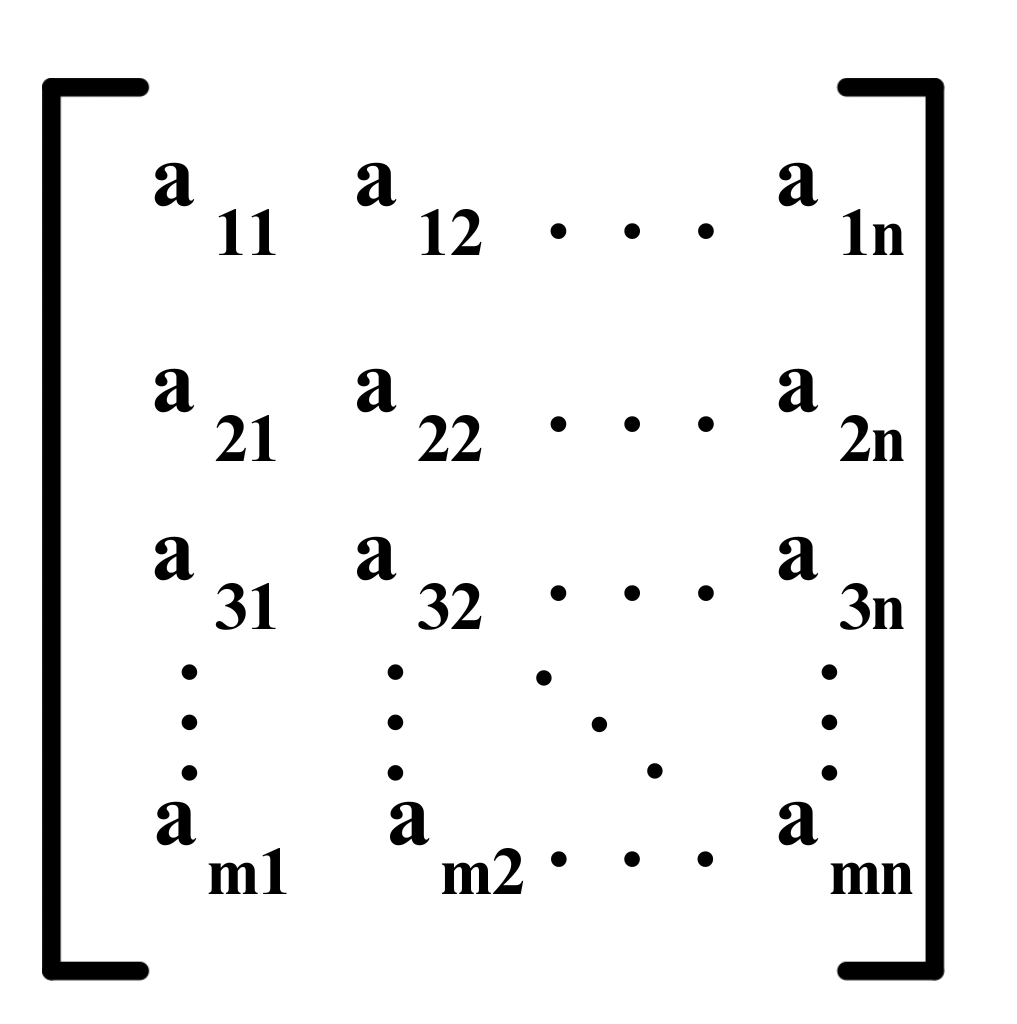
A =
[1 2 3]
[4 5 6]
[7 8 9]
- Rows: Horizontal lines (e.g., [1, 2, 3] is the first row)
- Columns: Vertical lines (e.g., [1, 4, 7] is the first column)
- Elements: Individual values in the matrix (e.g., 5 is located at row 2, column 2)
Types of 2D Matrices
- Square Matrix: Same number of rows and columns (e.g., 3×3)
- Rectangular Matrix: Different number of rows and columns (e.g., 2×4)
- Identity Matrix: Diagonal elements are 1; all other elements are 0
- Zero Matrix: All elements are 0
- Sparse Matrix: Contains mostly zeroes
Applications
2D matrices play a crucial role across various domains:
- Computer Graphics: Used for image rendering, transformations, and geometric modeling.
- Scientific Computing: Essential for solving complex simulations and mathematical computations.
- Machine Learning & Data Science: Represent datasets, perform matrix operations, and power neural networks.
- Cryptography: Employed in encoding and decoding algorithms to secure information.
- Game Development: Used in pathfinding, map grids, and collision detection.
- Network Theory: Represent graphs and connections using adjacency matrices.
Procedure
Step 1 – Create the Matrix:
- Name the function
create_matrix(m, n), where: mis the number of rowsnis the number of columns- Ask the user to enter
m × nvalues one by one - Return the created matrix
Step 2 – Traverse the Matrix:
- Name the function
traverse_matrix(matrix, r, c), where: matrixis the matrix to traverseris the row indexcis the column index- Check if the index is valid by comparing
randcwith matrix dimensions - If valid, print the value at
matrix[r][c] - If invalid, print
"Invalid index!"
Step 3 – Manipulate the Matrix:
- Name the function
manipulate_matrix(matrix, r, c, new_value), where: matrixis the matrix to manipulateris the row indexcis the column indexnew_valueis the new value to assign- Check if the index is valid
- If valid, update
matrix[r][c]withnew_valueand print a confirmation message - If invalid, print
"Invalid index!"
Step 4 – Transpose the Matrix:
- Name the function
transpose_matrix(matrix), where: matrixis the matrix to be transposed- Create a new matrix by swapping rows and columns
- Move each element from position
(i, j)to(j, i) - Return the transposed matrix
- Display the transpose matrix to the user
Final Output:
- First, display the entire matrix after creation
- Then, traverse and display the value at the specified index
- Next, manipulate the matrix and show the updated matrix
- Finally, generate and display the transpose of the matrix
Code
Example programs
// C++ Code Example


                #include <iostream>
                #include <vector>
                using namespace std;

                vector<vector<int>> createMatrix(int m, int n) {
                    vector<vector<int>> matrix(m, vector<int>(n));

                    cout << "Enter " << m * n << " elements:\n";
                    for (int i = 0; i < m; i++) {
                        for (int j = 0; j < n; j++) {
                            cin >> matrix[i][j];
                        }
                    }
                    return matrix;
                }

                void displayMatrix(const vector<vector<int>>& matrix) {
                    cout << "\nMatrix:\n";
                    for (const auto& row : matrix) {
                        for (int val : row) {
                            cout << val << " ";
                        }
                        cout << endl;
                    }
                }

                void traverseMatrix(const vector<vector<int>>& matrix) {
                    int r, c;

                    cout << "Enter row index: ";
                    cin >> r;
                    cout << "Enter column index: ";
                    cin >> c;

                    if (r < 0 || r >= matrix.size() || c < 0 || c >= matrix[0].size()) {
                        cout << "Invalid index!\n";
                    } else {
                        cout << "Value = " << matrix[r][c] << endl;
                    }
                }

                void manipulateMatrix(vector<vector<int>>& matrix) {
                    int r, c, newValue;

                    cout << "Enter row index: ";
                    cin >> r;
                    cout << "Enter column index: ";
                    cin >> c;
                    cout << "Enter new value: ";
                    cin >> newValue;

                    if (r < 0 || r >= matrix.size() || c < 0 || c >= matrix[0].size()) {
                        cout << "Invalid index!\n";
                    } else {
                        matrix[r][c] = newValue;
                        cout << "Value updated successfully.\n";
                    }
                }

                vector<vector<int>> transposeMatrix(const vector<vector<int>>& matrix) {
                    int rows = matrix.size();
                    int cols = matrix[0].size();

                    vector<vector<int>> transpose(cols, vector<int>(rows));

                    for (int i = 0; i < rows; i++) {
                        for (int j = 0; j < cols; j++) {
                            transpose[j][i] = matrix[i][j];
                        }
                    }

                    return transpose;
                }

                int main() {
                    int m, n;

                    cout << "Enter number of rows: ";
                    cin >> m;

                    cout << "Enter number of columns: ";
                    cin >> n;

                    vector<vector<int>> mat = createMatrix(m, n);

                    int choice;

                    do {
                        cout << "\n===== MENU =====\n";
                        cout << "1. Display Matrix\n";
                        cout << "2. Traverse Matrix\n";
                        cout << "3. Manipulate Matrix\n";
                        cout << "4. Transpose Matrix\n";
                        cout << "5. Exit\n";
                        cout << "Enter your choice: ";
                        cin >> choice;

                        switch (choice) {
                            case 1:
                                displayMatrix(mat);
                                break;

                            case 2:
                                traverseMatrix(mat);
                                break;

                            case 3:
                                manipulateMatrix(mat);
                                break;

                            case 4: {
                                vector<vector<int>> transposed = transposeMatrix(mat);

                                cout << "\nTranspose Matrix:\n";
                                for (const auto& row : transposed) {
                                    for (int val : row) {
                                        cout << val << " ";
                                    }
                                    cout << endl;
                                }
                                break;
                            }

                            case 5:
                                cout << "Exiting Program...\n";
                                break;

                            default:
                                cout << "Invalid Choice!\n";
                        }

                    } while (choice != 5);

                    return 0;
                }
# Python Code Example
                # Step 1: Create Matrix
                def create_matrix(m, n):
                    matrix = []

                    print(f"Enter {m*n} elements:")
                    for i in range(m):
                        row = []
                        for j in range(n):
                            value = int(input(f"Element [{i}][{j}]: "))
                            row.append(value)
                        matrix.append(row)

                    return matrix


                # Display Matrix
                def display_matrix(matrix):
                    print("\nMatrix:")
                    for row in matrix:
                        print(row)


                # Step 2: Traverse Matrix
                def traverse_matrix(matrix):
                    r = int(input("Enter row index: "))
                    c = int(input("Enter column index: "))

                    if r < 0 or r >= len(matrix) or c < 0 or c >= len(matrix[0]):
                        print("Invalid index!")
                    else:
                        print("Value =", matrix[r][c])


                # Step 3: Manipulate Matrix
                def manipulate_matrix(matrix):
                    r = int(input("Enter row index: "))
                    c = int(input("Enter column index: "))
                    new_value = int(input("Enter new value: "))

                    if r < 0 or r >= len(matrix) or c < 0 or c >= len(matrix[0]):
                        print("Invalid index!")
                    else:
                        matrix[r][c] = new_value
                        print("Value updated successfully.")


                # Step 4: Transpose Matrix
                def transpose_matrix(matrix):
                    rows = len(matrix)
                    cols = len(matrix[0])

                    transpose = []

                    for j in range(cols):
                        row = []
                        for i in range(rows):
                            row.append(matrix[i][j])
                        transpose.append(row)

                    return transpose


                # Main Program
                m = int(input("Enter number of rows: "))
                n = int(input("Enter number of columns: "))

                mat = create_matrix(m, n)

                while True:
                    print("\n===== MENU =====")
                    print("1. Display Matrix")
                    print("2. Traverse Matrix")
                    print("3. Manipulate Matrix")
                    print("4. Transpose Matrix")
                    print("5. Exit")

                    choice = int(input("Enter your choice: "))

                    if choice == 1:
                        display_matrix(mat)

                    elif choice == 2:
                        traverse_matrix(mat)

                    elif choice == 3:
                        manipulate_matrix(mat)

                    elif choice == 4:
                        transposed = transpose_matrix(mat)

                        print("\nTranspose Matrix:")
                        for row in transposed:
                            print(row)

                    elif choice == 5:
                        print("Exiting Program...")
                        break

                    else:
                        print("Invalid Choice!")
Matrix Learning Journey
Welcome! In this lab, we will learn matrices step by step:
1. Creation of Matrix → 2. Traversal → 3. Manipulation → 4. Transpose
Result
Upon successful completion of this virtual lab, learners gain a comprehensive understanding of two dimensional matrices and their fundamental operations. They are able to create matrices, traverse and access elements using indices, perform basic manipulations and generate matrix transposes. Through interactive visualizations, coding examples and quizzes, the lab strengthens both conceptual understanding and practical problem solving skills, enabling learners to confidently apply matrix concepts in programming and real world applications.
Quiz
Sample Quiz Question:
Which matrix has equal rows and columns?
A. Identity
B. Zero
✓ C. Square
D. Sparse
References
- W3Schools. (n.d.). Python Lists. Retrieved from https://www.w3schools.com/python/python_lists.asp
- Lay, D. C., Lay, S. R., & McDonald, J. J. (2021). Linear Algebra and Its Applications (6th ed.). Pearson Education.
- Strang, G. (2016). Introduction to Linear Algebra (5th ed.). Wellesley-Cambridge Press.
Team & Tools
Students
Mentor
- Ms. Shiva Saini
Tools Used
- Vanilla HTML, CSS, JS - for creating the web page